AI Video Clip Generator: Turn Long Videos Into Shorts
 By iiniit TeamPublished October 16, 2026·6 min read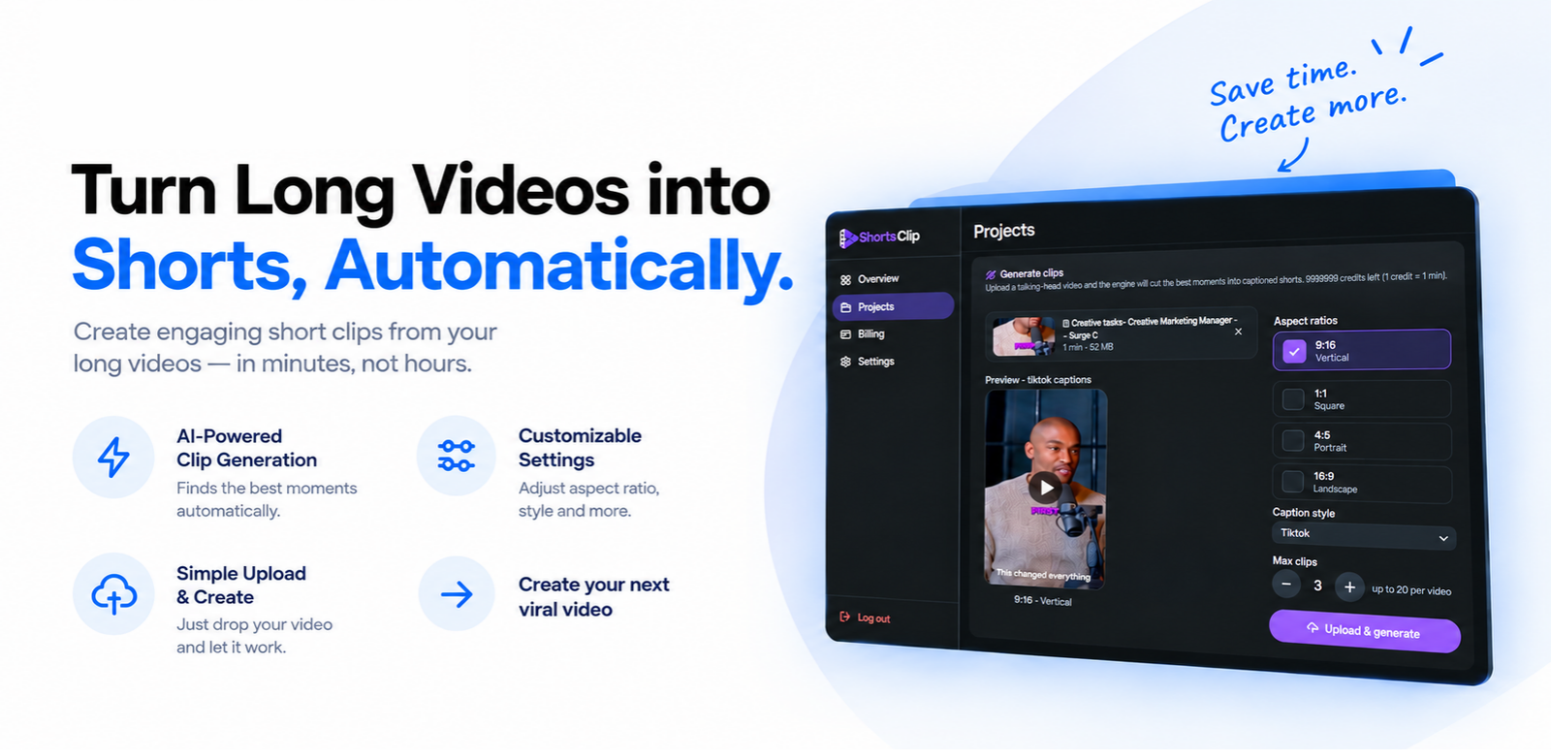
AI Video Clip Generator: Turn Long Videos Into Shorts
Creating short-form video content can be time-consuming. A single long recording may contain several useful moments, but finding those moments, trimming the footage, choosing the right format, and preparing captions can require repeated editing.
An AI video clip generator can simplify this workflow by helping identify promising moments and turn longer videos into shorter clips. For creators, marketers, educators, and businesses that regularly publish video content, this approach can reduce repetitive editing work and make content production easier to manage.
ShortsClip is designed around this workflow: upload a talking-head video, generate short clips, and customize the output for different aspect ratios and caption styles.
What Is an AI Video Clip Generator?
An AI video clip generator is a tool that helps transform longer video recordings into shorter, more focused clips. Depending on the tool, it may assist with finding useful moments, creating short segments, and preparing clips for social platforms.
Instead of manually reviewing every part of a recording and building each short from scratch, creators can start with automated clip generation and then review the results.
The goal is not simply to make a video shorter. It is to help turn useful moments from longer content into standalone clips that are easier to share and consume.
Why Turn Long Videos Into Short Clips?
Long-form videos can contain valuable information, but viewers may not always have time to watch the entire recording. Short clips offer another way to present a key idea, useful tip, or memorable moment.
Make More Use of Existing Content
A webinar, interview, tutorial, or talking-head recording may contain multiple topics worth sharing individually.
Turning those moments into short clips can help you reuse existing footage instead of creating every social post from the beginning.
Reduce Repetitive Editing Work
Manual editing often involves reviewing footage, finding suitable moments, trimming the timeline, and preparing each clip for publication.
An automated workflow can help reduce some of these repetitive steps. You should still review the generated clips to make sure the context, timing, and message are right.
Prepare Videos for Different Formats
Different publishing destinations may need different aspect ratios. A vertical clip can suit a short-form mobile feed, while a landscape format may work better in other contexts.
Having format options in one workflow can make it easier to prepare content for different placements.
How ShortsClip Works
ShortsClip provides a straightforward workflow for generating short clips from longer talking-head videos.
1. Upload Your Video
Start by uploading a talking-head video. This gives the clip-generation workflow the source footage it needs to identify moments for shorter edits.
For best results, begin with a recording that has clear audio, a focused topic, and useful moments that can stand on their own.
2. Generate Short Clips
ShortsClip is designed to identify promising moments and turn them into short clips with captions.
Automated selection can help speed up the initial editing process, but the generated results should still be checked for accuracy, context, and pacing before publishing.
3. Choose an Aspect Ratio
The ShortsClip interface includes several aspect-ratio options:
9:16 — Vertical: suited to many mobile-first short-video placements.
1:1 — Square: useful for square-format social content.
4:5 — Portrait: another option for portrait-oriented feeds.
16:9 — Landscape: useful for wide video layouts.
Choose the format that matches where you plan to publish and how viewers will watch the clip.
4. Select a Caption Style and Clip Count
The interface also includes caption-style selection and a setting for the maximum number of clips to generate. The visible interface supports selecting up to 20 clips per video.
These controls help you tailor the output to your content workflow. Review captions before publishing, especially when a video includes technical terms, names, or specialized vocabulary.
Best Practices for Creating Better Short Clips
Automation can help with editing, but the quality of the source content and the final review still matter.
Start with a clear source video. A focused recording with understandable audio is easier to turn into useful clips.
Keep the original meaning intact. A clip should not remove context in a way that changes the speaker's message.
Choose the right aspect ratio. Consider the platform, viewing experience, and placement before generating or publishing a clip.
Review captions carefully. Correct spelling, punctuation, names, and technical terms so viewers can follow the message.
Check every generated clip. Confirm that the beginning catches attention, the ending feels complete, and the content delivers a clear idea.
Use a consistent publishing workflow. Organize clips by topic or campaign and maintain a regular review process before posting.
Who Can Benefit From an AI Video Clip Generator?
An AI video clip generator can be useful for people and teams who regularly work with longer recordings.
Content creators: repurpose talking-head videos and recorded discussions.
Marketing teams: prepare short clips from interviews, explainers, and campaign videos.
Educators and trainers: highlight useful sections from lessons or presentations.
Podcasters and interviewers: identify moments that may work as standalone social clips.
Small businesses: make more use of existing video content without starting every edit from scratch.
The best fit depends on the type of footage you create, how often you publish, and how much review your clips require.
Make Your Video Workflow More Efficient With ShortsClip
Creating short-form content does not always need to start with a blank editing timeline. An AI-assisted workflow can help identify useful moments from longer recordings and prepare clips for different publishing formats.
ShortsClip brings together video upload, automated clip generation, aspect-ratio choices, caption-style settings, and clip-count controls in one interface.
If you regularly create talking-head videos, interviews, tutorials, or other long recordings, this workflow can help simplify the first stage of turning that content into short clips.
Explore more software from iiniit.
Frequently Asked Questions
What is an AI video clip generator?
It is a tool that helps transform longer video recordings into shorter clips, often by automating parts of moment selection and clip creation.
Can ShortsClip generate multiple clips from one video?
Yes. The ShortsClip interface includes a maximum-clip setting and visibly supports up to 20 clips per video.
Which aspect ratios does ShortsClip support?
The visible interface offers 9:16 vertical, 1:1 square, 4:5 portrait, and 16:9 landscape options.
Should AI-generated clips be reviewed before publishing?
Yes. Review each clip for context, timing, accuracy, caption quality, and overall clarity before publishing.
Does automatically generating clips eliminate all video editing?
Not necessarily. Automation can reduce repetitive work, but reviewing the clips and making adjustments may still be necessary to achieve the intended result.
Conclusion
Repurposing long videos into short clips can help creators make better use of existing footage. An AI video clip generator can simplify parts of this process by helping identify moments, generate clips, and prepare different formats.
With its upload-and-generate workflow and customizable output settings, ShortsClip is built to make creating short-form video content more straightforward.
Spend less time on repetitive editing and more time developing content worth sharing.