AI Video Clip Generator: Make More Content from One Video
 By iiniit TeamPublished October 28, 2026·6 min read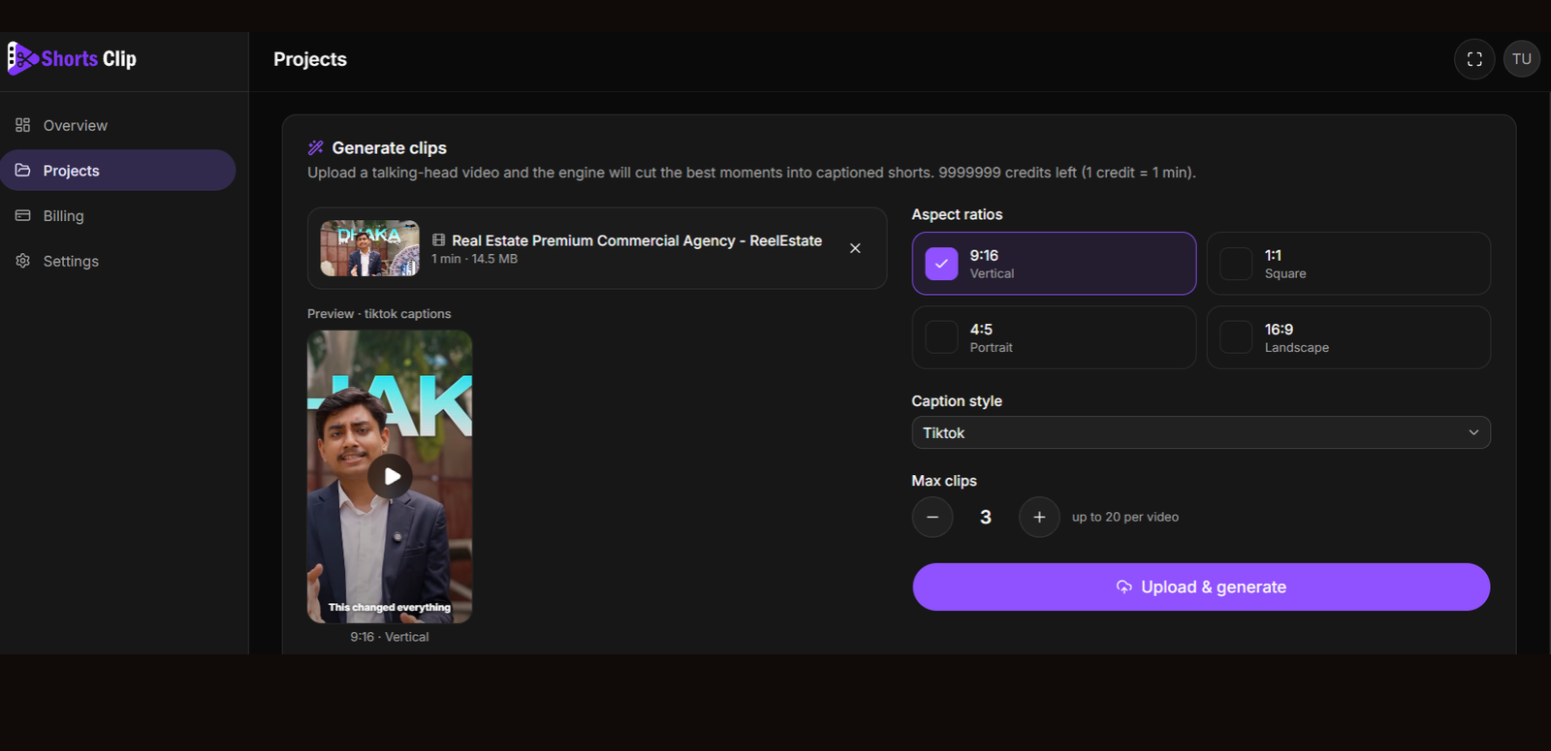
How to Turn Long Videos into Short Clips with an AI Video Clip Generator
You’ve recorded a podcast, finished a webinar, or published a long video. There’s plenty of useful content in it—but turning that content into short videos takes time.
You need to find the right moments, cut unnecessary sections, adjust the framing, and prepare captions. Doing everything manually can make video repurposing feel like another full-time job.
An AI video clip generator can help simplify this process by identifying useful moments in longer recordings and turning them into shorter videos. Instead of starting every clip from scratch, you can get more use out of content you’ve already created.
That’s the idea behind ShortsClip, a tool designed to help turn long talking-head videos into short-form content.
Why Turn Long Videos into Short Clips?
Long videos often contain several ideas that can stand on their own. A single interview might include a practical tip, an interesting opinion, a useful explanation, and a memorable story.
Each of these moments could become a separate short video.
Repurposing existing footage helps you:
Get more from existing content: Reuse valuable moments instead of recording something new every time.
Create content for social media: Prepare shorter videos for platforms such as YouTube Shorts, Instagram Reels, and TikTok.
Reduce repetitive editing: Spend less time searching through long recordings and cutting clips manually.
Share one idea at a time: Give viewers a focused takeaway without asking them to watch an entire recording.
The goal isn’t simply to produce more videos. It’s to make useful content easier to discover and watch.
What Is an AI Video Clip Generator?
An AI video clip generator is a tool that helps transform longer video recordings into shorter segments. Depending on the tool, it may help identify important moments, create clips, add captions, or adjust the video layout.
This can be useful for content creators, marketers, educators, podcasters, and businesses that regularly publish video.
Rather than manually reviewing every minute of footage, you can use an automated workflow to get started, review the results, and make adjustments before publishing.
How ShortsClip Helps You Create Short-Form Videos
ShortsClip is built to make the process of turning longer talking-head videos into short clips more manageable.
1. Start with a Long Video
Upload a suitable video recording. It could be an interview, a tutorial, a presentation, or another talking-head video containing useful information.
You don’t need to plan an entirely new recording just to create short-form content. Your existing footage can be the starting point.
2. Generate Short Clips
ShortsClip helps identify moments that can work as individual clips. This gives you a starting point without requiring you to search through the entire recording and manually create every segment.
Review each result to make sure the clip communicates a complete idea and preserves the speaker’s intended meaning.
3. Choose the Video Format
Different placements may need different dimensions. ShortsClip provides multiple aspect ratio options:
9:16: Vertical video for mobile-first short-form content.
1:1: Square video for square-format posts.
4:5: Portrait format for suitable social media feeds.
16:9: Landscape video for wider layouts.
Choose the format that fits where you intend to publish the clip.
4. Add and Adjust Captions
Captions help viewers follow what is being said, including when they watch without sound. ShortsClip offers caption-style options so you can prepare clips for your preferred presentation.
Before publishing, check names, technical terms, punctuation, and any wording that automated captions may have misinterpreted.
5. Review and Export
Give each clip a final review. Check the opening, ending, framing, captions, and overall context. Make any necessary adjustments, then export the finished video for publishing.
Automation can reduce repetitive work, but a human review helps ensure the final content represents your message accurately.
Which Videos Work Well for Repurposing?
An AI video clip generator can be useful whenever a longer recording contains several distinct, worthwhile moments.
Podcasts and Interviews
Turn a useful answer, strong opinion, or memorable story into a standalone clip.
Webinars and Presentations
Share individual lessons, practical explanations, or frequently asked questions without requiring viewers to watch the full session.
Tutorials and Educational Videos
Break a longer explanation into focused clips that each cover one tip, step, or concept.
Business and Marketing Videos
Reuse product explanations, expert insights, and helpful advice across your content channels.
The important thing is to choose moments that make sense on their own. A short clip should give viewers a clear reason to watch, not leave them wondering what happened before it started.
Tips for Better AI-Generated Video Clips
Automated clipping is a starting point. A few simple checks can make the finished videos more useful.
Keep one main idea per clip. A focused video is easier to follow than one that jumps between unrelated topics.
Check the context. Removing a sentence can sometimes change the meaning of what the speaker intended.
Make sure the subject stays visible. Review the framing, especially when converting a wide video into a vertical format.
Proofread captions. Correct spelling and accurate wording make your video easier to understand.
Review the first few seconds. The opening should quickly establish what the clip is about and give viewers a reason to keep watching.
Choose quality over quantity. A few genuinely useful clips are more valuable than a large collection of incomplete or repetitive ones.
Turn Existing Footage into Your Next Batch of Content
Creating short-form content doesn’t always require filming something new. Sometimes, your next useful video is already sitting inside a recording you’ve published—or one you haven’t edited yet.
An AI video clip generator can help you find another use for that footage, prepare shorter segments, and make the editing process more manageable.
With ShortsClip, you can upload a long talking-head video, generate short clips, choose a format, adjust caption styles, and review the results before exporting.
Ready to make more from your existing videos?
Try ShortsClip and explore a simpler workflow for creating short-form video content.
You can also explore more tools on the iiniit products page.
Frequently Asked Questions
What is the best way to turn a long video into short clips?
Start by identifying the strongest standalone moments in the recording. Use a video clipping tool to help create shorter segments, then review each clip for context, framing, captions, and clarity before publishing.
What does an AI video clip generator do?
An AI video clip generator helps turn longer recordings into shorter videos. Depending on its features, it may identify useful moments, generate clips, and help prepare captions or different video formats.
Can I turn one video into multiple short videos?
Yes. A longer recording can contain several useful moments that work as separate clips. The number of worthwhile clips depends on the length and content of the original video.
Which aspect ratios are available in ShortsClip?
ShortsClip provides 9:16, 1:1, 4:5, and 16:9 aspect ratio options, allowing you to prepare content for different video layouts.
Should I review AI-generated clips before publishing?
Yes. Check that each clip preserves the original meaning, starts and ends naturally, keeps the speaker visible, and includes accurate captions. A final review helps maintain content quality.
Final CTA: Make your existing videos work harder. Try ShortsClip today.